Offer familiar ways to sign in
Connect configured providers such as Microsoft Entra ID, Google and Okta for employees, contractors, customers and partners. People can use accounts they already recognize.
Connect the accounts people already use, make sign-in feel like part of your service and give software its own accountable access. dc:id provides identity federation and managed application identities through standards-based connections.
Support native registration, passkeys, MFA, recovery and organizational administration. Customer Accounts and portable cross-service branding give customers a consistent experience while preserving service-specific permissions.
Discuss your identity journey Plan enterprise identity Plan service deploymentConnect configured providers such as Microsoft Entra ID, Google and Okta for employees, contractors, customers and partners. People can use accounts they already recognize.
Shape sign-in with your logo, background, colours and wording. Give service owners a preview they can review before applying changes.
Separate tenant settings and branding for different services or business contexts. Evaluate organization memberships and scoped application roles within an explicitly adopted environment.
Register machine applications, define API resources and assign explicit scopes. Use short-lived access tokens for service-to-service requests.
Rotate managed application secrets with a controlled overlap. Enable automatic rotation for supported Microsoft provider connections and compatible dc:id clients.
Use native registration, passkeys, authenticator MFA, email codes or links, recovery and session controls in eligible managed tenants.
Support registration and email verification within a branded journey, alongside the configured federation options your service needs.
Configure passwords, passkeys and email codes or confirmation links. Application authentication policies can require authenticator MFA or stronger verification for the intended journey.
Account recovery retains required MFA checks. Session controls support reviewing and ending sessions when access circumstances change.
Connect the account journey, email delivery and support arrangements around the people using your service.
Plan your sign-in journeyConnect configured organizational and personal providers behind an OpenID Connect application interface. Match the account route to the people using the service.
Manage machine registrations and explicit API grants separately from interactive sign-in. Name credential owners and test the replacement process.
Manage memberships, application assignments and delegated administration around the business context you need. Receiving applications enforce their validated permissions.
When access also depends on an organization’s assessed role in a network, explore dc:trust alongside dc:id. Scheme decisions and identity permissions remain distinct.
Plan enterprise identity and access Explore framework assuranceOkta Workforce Identity, Auth0, Microsoft Entra and Google’s identity services address different parts of workforce, customer and application identity. Compare the complete scope your business needs.
Consider dc:id when a UK-based relationship, self-hosting options, separate identity environments and standards-based application connections fit your operating model. Build on existing account providers and use native identity, delegated administration and organizational access where relevant.
Start with your workforce, customer and partner journeys; then assess application permissions, integration coverage, operational responsibilities and service scope and deployment.
Compare Okta/Auth0, Microsoft, Google and Data ClanBring your page name, introduction, imagery and colours together in one workspace, with a preview alongside the controls.
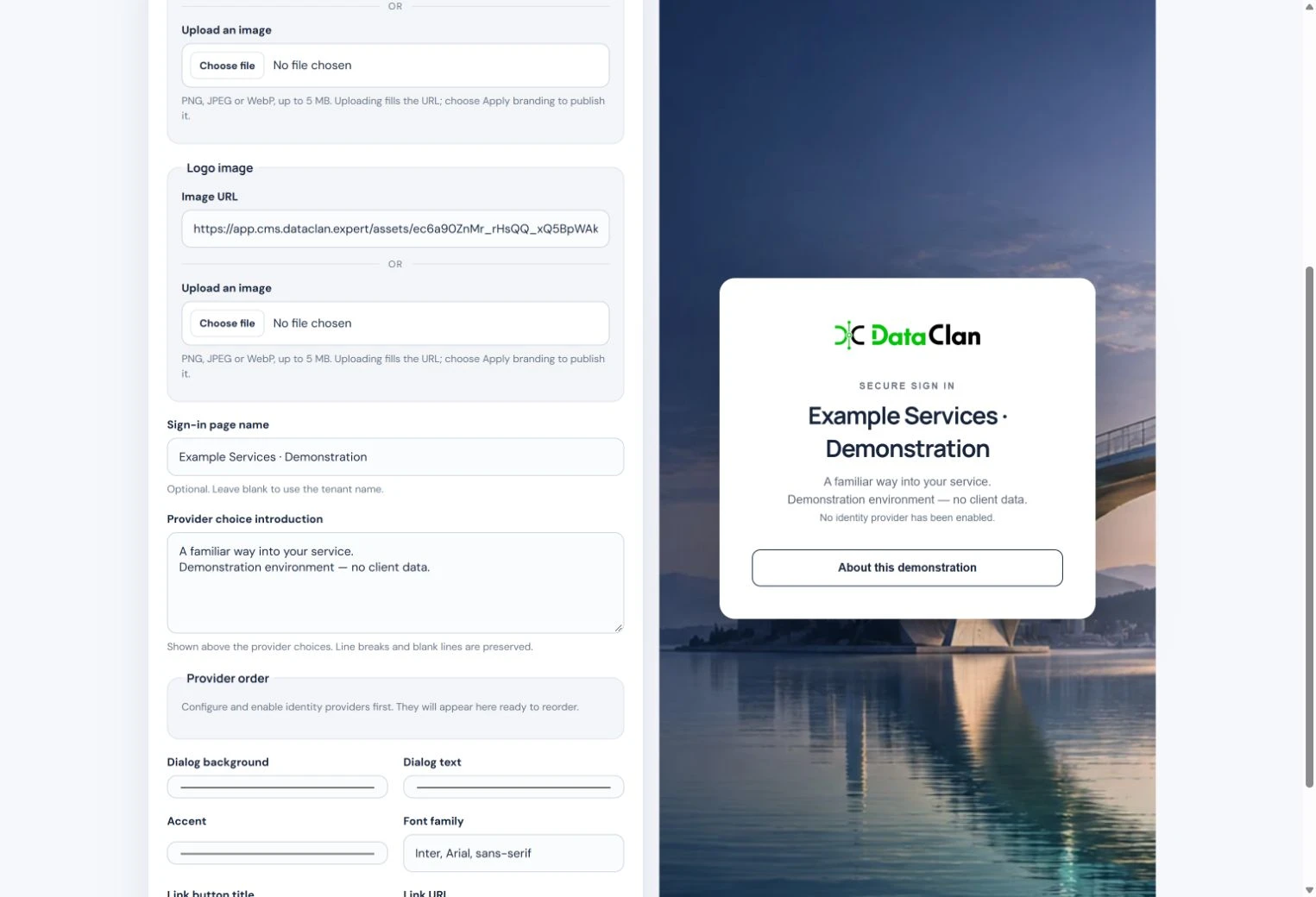
Review how the elements work together before applying your changes, so the sign-in page feels like part of your service.
Explore the illustrated walkthrough Discuss your sign-in experienceConfigure Microsoft work or personal accounts, Google, Apple, LinkedIn, Okta and supported generic OpenID Connect providers for the relevant tenant. Account types and provider setup determine the choices offered.
Work-email routing can help people reach the configured organizational provider. Tenant branding keeps that journey connected to your service.
Understand the sign-in journeyData synchronization, scheduled processing and partner integrations need access even when nobody is signing in. dc:id’s standard machine application management gives those connections their own registrations and explicitly granted API scopes.
Use distinct clients and grants for ordinary processing and sensitive operational tasks. Five-minute access tokens are the default for managed applications.
Manage one-time secret reveal and overlapping credentials during a deployment. Provisioning and reconciliation status help administrators see whether a requested change has completed.
Application-specific integration manifests describe the configured issuer, endpoints and client. Separate environments help teams test changes before adopting them in a live service.
Explore application-to-API access Plan your first integrationUse delegated administration of explicitly assigned tenants and organizations, with separate administrator and read-only roles. Apply the model to your intended business unit, operating company or customer-team workflow.
Organization memberships, application assignments and scoped roles model who may use which service in a selected business context. Opted-in applications receive organization and permission claims and enforce the agreed resource rules.
Evaluate membership and role changes alongside tenant user/session controls. Role-relevant help and operation status support an understandable administration process.
Shape the administration workflow around the teams, resources and responsibilities your organization needs to manage.
Explore organizational accessUse federated sign-in for familiar accounts and evaluate native methods where service-specific accounts fit your audience.
Agree which applications, API actions and organizational contexts each identity should use. Relying services enforce the validated token and resource rules.
Agree service ownership, hosting, integration and support responsibilities for the capabilities you adopt.
The shared customer-branding profile carries organization and service names, logos, colours, light and dark themes, and support links between dc:id, dc:pki and dc:trust through explicit export and import.
Customer Accounts group the service resources a customer owns or can access. Each service checks its own identity, tenant or workspace permissions. In dc:id, an existing tenant’s explicit sign-in branding can remain independent of the account default.
Account and branding portability preserves local memberships, credentials and sender approvals. Configure customer-owned domains and approved email identities through the relevant service and provider arrangements.
Plan a branded customer experience Discuss your customer journeyTell us who needs to connect, what they need to do and what evidence would give your organization confidence. We can explore dc:id, dc:pki, dc:trust or a combination, then agree a focused next step.
For dc:trust, include the scheme or network you operate and the roles you need to assess. For identity or certificates, name the application or service connection. UK-based support and availability in other regions are agreed around your requirements.
Discuss Identity and Trust servicesExplore Data Clan’s data, technology and organizational expertise, meet the people and review the work behind our approach.
Data Clan — company and expertise Meet the Clan Policies and supplier assurance